SaltyCrane Blog — Notes on JavaScript and web development

Notes on sshfs on Ubuntu

sshfs is an easy way to mount a remote filesystem using ssh and FUSE. If your remote server is already running a ssh server that supports sftp (Ubuntu's ssh server does), there is nothing to set up on the remote server and set up on the client is relatively easy.

Other options for mounting a remote filesystem are WebDAV, Samba, and NFS. I'm no expert, but from what I've gathered, sshfs is faster than WebDAV and slower than Samba and NFS. However, Samba and NFS are typically more difficult to set up than sshfs. Here are my notes for setting up sshfs. I am running on Ubuntu Hardy.

OPTION 1: Use sshfs from the command line

  • Install sshfs
    $ apt-get update
    $ apt-get install sshfs
    
  • Create a mount point
    $ mkdir -p /var/www/remote_files
    
  • Mount the remote filesystem
    $ sshfs [email protected]:/mnt/files /var/www/remote_files \
    > -o IdentityFile=/path/to/my_ssh_keyfile \
    > -o ServerAliveInterval=60 -o allow_other
    
    where:
    • root is the ssh username
    • 10.232.139.234 is the remote host
    • /mnt/files is the remote path
    • /var/www/remote_files is the local path
    • /path/to/my_ssh_keyfile is the ssh keyfile
    • The ServerAliveInterval option will keep your connection from timing out.
    • The allow_other option allows other users to access the filesystem

OPTION 2: Use sshfs with /etc/fstab

  • Install sshfs as above
  • Edit /etc/fstab:
    sshfs#[email protected]:/mnt/files /var/www/remote_files fuse allow_other,IdentityFile=/path/to/my_ssh_keyfile,ServerAliveInterval=60 0 0
    where the options are explained above.
  • Create a mount point
    $ mkdir -p /var/www/remote_files
    
  • Mount
    $ mount /var/www/remote_files
    

For more help, try sshfs --help

usage: sshfs [user@]host:[dir] mountpoint [options]

general options:
    -o opt,[opt...]        mount options
    -h   --help            print help
    -V   --version         print version

SSHFS options:
    -p PORT                equivalent to '-o port=PORT'
    -C                     equivalent to '-o compression=yes'
    -1                     equivalent to '-o ssh_protocol=1'
    -o reconnect           reconnect to server
    -o sshfs_sync          synchronous writes
    -o no_readahead        synchronous reads (no speculative readahead)
    -o sshfs_debug         print some debugging information
    -o cache=YESNO         enable caching {yes,no} (default: yes)
    -o cache_timeout=N     sets timeout for caches in seconds (default: 20)
    -o cache_X_timeout=N   sets timeout for {stat,dir,link} cache
    -o workaround=LIST     colon separated list of workarounds
             none             no workarounds enabled
             all              all workarounds enabled
             [no]rename       fix renaming to existing file (default: off)
             [no]nodelay      set nodelay tcp flag in ssh (default: on)
             [no]nodelaysrv   set nodelay tcp flag in sshd (default: off)
             [no]truncate     fix truncate for old servers (default: off)
             [no]buflimit     fix buffer fillup bug in server (default: on)
    -o idmap=TYPE          user/group ID mapping, possible types are:
             none             no translation of the ID space (default)
             user             only translate UID of connecting user
    -o ssh_command=CMD     execute CMD instead of 'ssh'
    -o ssh_protocol=N      ssh protocol to use (default: 2)
    -o sftp_server=SERV    path to sftp server or subsystem (default: sftp)
    -o directport=PORT     directly connect to PORT bypassing ssh
    -o transform_symlinks  transform absolute symlinks to relative
    -o follow_symlinks     follow symlinks on the server
    -o no_check_root       don't check for existence of 'dir' on server
    -o SSHOPT=VAL          ssh options (see man ssh_config)

FUSE options:
    -d    -o debug          enable debug output (implies -f)
    -f                      foreground operation
    -s                      disable multi-threaded operation

    -o allow_other          allow access to other users
    -o allow_root           allow access to root
    -o nonempty     allow mounts over non-empty file/dir
    -o default_permissions enable permission checking by kernel
    -o fsname=NAME          set filesystem name
    -o subtype=NAME         set filesystem type
    -o large_read           issue large read requests (2.4 only)
    -o max_read=N           set maximum size of read requests

    -o hard_remove          immediate removal (don't hide files)
    -o use_ino              let filesystem set inode numbers
    -o readdir_ino          try to fill in d_ino in readdir
    -o direct_io            use direct I/O
    -o kernel_cache         cache files in kernel
    -o [no]auto_cache       enable caching based on modification times
    -o umask=M              set file permissions (octal)
    -o uid=N                set file owner
    -o gid=N                set file group
    -o entry_timeout=T      cache timeout for names (1.0s)
    -o negative_timeout=T  cache timeout for deleted names (0.0s)
    -o attr_timeout=T       cache timeout for attributes (1.0s)
    -o ac_attr_timeout=T   auto cache timeout for attributes (attr_timeout)
    -o intr                 allow requests to be interrupted
    -o intr_signal=NUM      signal to send on interrupt (10)
    -o modules=M1[:M2...]  names of modules to push onto filesystem stack

    -o max_write=N          set maximum size of write requests
    -o max_readahead=N      set maximum readahead
    -o async_read           perform reads asynchronously (default)
    -o sync_read            perform reads synchronously

Module options:

[subdir]
    -o subdir=DIR           prepend this directory to all paths (mandatory)
    -o [no]rellinks         transform absolute symlinks to relative

[iconv]
    -o from_code=CHARSET   original encoding of file names (default: UTF-8)
    -o to_code=CHARSET      new encoding of the file names (default: ANSI_X3.4-1968)

References

Webdav vs. sshfs

How to sort a list of dicts in Python

I'm using the MongoDB group function (it's similar to SQL's GROUP BY) to aggregate some results for my live-log-analyzer project. This function is pretty cool, but it does not sort the grouped data. Here is how to sort the data. (It is only one line of Python, but I have a hard time remembering how to do this.)

DATA is the output of the mongoDB group function. I want to sort this list of dicts by 'ups_ad'.

from pprint import pprint

DATA = [
    {u'avg': 2.9165000000000001,
     u'count': 10.0,
     u'total': 29.165000000000003,
     u'ups_ad': u'10.194.154.49:80'},
    {u'avg': 2.6931000000000003,
     u'count': 10.0,
     u'total': 26.931000000000001,
     u'ups_ad': u'10.194.155.176:80'},
    {u'avg': 1.9860909090909091,
     u'count': 11.0,
     u'total': 21.847000000000001,
     u'ups_ad': u'10.195.71.146:80'},
    {u'avg': 1.742818181818182,
     u'count': 11.0,
     u'total': 19.171000000000003,
     u'ups_ad': u'10.194.155.48:80'}
    ]

data_sorted = sorted(DATA, key=lambda item: item['ups_ad'])
pprint(data_sorted)

Results:

[{u'avg': 2.9165000000000001,
  u'count': 10.0,
  u'total': 29.165000000000003,
  u'ups_ad': u'10.194.154.49:80'},
 {u'avg': 2.6931000000000003,
  u'count': 10.0,
  u'total': 26.931000000000001,
  u'ups_ad': u'10.194.155.176:80'},
 {u'avg': 1.742818181818182,
  u'count': 11.0,
  u'total': 19.171000000000003,
  u'ups_ad': u'10.194.155.48:80'},
 {u'avg': 1.9860909090909091,
  u'count': 11.0,
  u'total': 21.847000000000001,
  u'ups_ad': u'10.195.71.146:80'}]
References:

Update 2010-04-28: Apparently I didn't use Google properly when I first wrote this post. Searching today produced several sources for doing exactly this.

os.path.relpath() source code for Python 2.5

Today I needed to use the os.path.relpath() function. However this function was introduced in Python 2.6 and I am using Python 2.5 for my project. Luckily, James Gardner has written a version that works with Python 2.5 (on Posix systems (which mine is (Linux))). His relpath function is part of his BareNecessities package. You can view the documentation here.

Here is James Gardner's relpath function:

from posixpath import curdir, sep, pardir, join

def relpath(path, start=curdir):
    """Return a relative version of a path"""
    if not path:
        raise ValueError("no path specified")
    start_list = posixpath.abspath(start).split(sep)
    path_list = posixpath.abspath(path).split(sep)
    # Work out how much of the filepath is shared by start and path.
    i = len(posixpath.commonprefix([start_list, path_list]))
    rel_list = [pardir] * (len(start_list)-i) + path_list[i:]
    if not rel_list:
        return curdir
    return join(*rel_list)

Adding a per-post comments feed with Django 1.0

I've added an Atom feed for comments on a single post on this blog (per a request in the comments). Here are my notes. I am using Django 1.0. (Note: the Django feeds framework has changed for 1.2. See the Django 1.2 release notes for more information.)

Added to /srv/SaltyCrane/iwiwdsmi/feeds.py:

from django.contrib.comments.models import Comment
from django.contrib.syndication.feeds import Feed, FeedDoesNotExist
from django.utils.feedgenerator import Atom1Feed
from django.core.exceptions import ObjectDoesNotExist
from iwiwdsmi.myblogapp.models import Post
from iwiwdsmi.settings import SITE_NAME

class CommentsByPost(Feed):
    title_template = "feeds/comments_title.html"
    description_template = "feeds/comments_description.html"
    feed_type = Atom1Feed

    def get_object(self, bits):
        if len(bits) != 1:
            raise ObjectDoesNotExist
        return Post.objects.get(id=bits[0])

    def title(self, obj):
        return '%s' % obj

    def description(self, obj):
        return 'Comments on "%s": %s' % (obj, SITE_NAME)

    def link(self, obj):
        if not obj:
            raise FeedDoesNotExist
        return obj.get_absolute_url() + "#comments"

    def items(self, obj):
        return Comment.objects.filter(object_pk=str(obj.id),
                                      is_public=True,
                                      is_removed=False,
                                      ).order_by('-submit_date')

    def item_pubdate(self, item):
        return item.submit_date

Added to /srv/SaltyCrane/iwiwdsmi/urls.py:

from iwiwdsmi.feeds import CommentsByPost
feeds = {
    'comments': CommentsByPost,
}

urlpatterns = patterns(
    '',
    (r'^feeds/(?P<url>.*)/$', 'django.contrib.syndication.views.feed',
     {'feed_dict': feeds}),
)

Added /srv/SaltyCrane/iwiwdsmi/templates/feeds/comments_title.html:

Comment by {{ obj.name|escape }}

Added /srv/SaltyCrane/iwiwdsmi/templates/feeds/comments_description.html:

{% load markup %}
{{ obj.comment|markdown:"safe" }}

Added to /srv/SaltyCrane/iwiwdsmi/templates/myblogapp/singlepost.html:

<a href="/feeds/comments/{{ post.id }}/">
  <img src="http://saltycrane.s3.amazonaws.com/image/icon_feed_orange_14x14_1.png" style="border: 0pt none ; vertical-align: middle;" alt="feed icon">
  Comments feed for this post</a>

jQuery flot stacked bar chart example

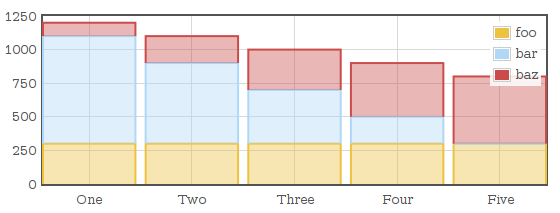
Flot is a JavaScript plotting library for jQuery. Here are my steps to create a simplified version of the stacked bar chart example from the flot examples page. For more information, see the API documentation.

  • Download and unpack:
    cd ~/src/jquery/flot_examples
    curl http://flot.googlecode.com/files/flot-0.6.tar.gz | tar xzf -
  • ~/src/jquery/flot_examples/stacked_bar_ex.html:
    <!DOCTYPE HTML PUBLIC "-//W3C//DTD HTML 4.01//EN" "http://www.w3.org/TR/html4/strict.dtd">
    <html>
    <head>
      <meta http-equiv="Content-Type" content="text/html; charset=utf-8" />
      <!--[if IE]><script language="javascript" type="text/javascript" src="flot/excanvas.min.js"></script><![endif]--> 
      <script type="text/javascript" src="http://ajax.googleapis.com/ajax/libs/jquery/1.4.2/jquery.min.js"></script>
      <script type="text/javascript" src="flot/jquery.flot.js"></script>
      <script type="text/javascript" src="flot/jquery.flot.stack.js"></script>
      <title>Flot stacked bar example</title>
    </head>
    <body>
      <div id="placeholder" style="width:550px;height:200px;"></div>
      <script type="text/javascript" src="stacked_bar_ex.js"></script>
    </body>
    </html>
    
  • ~/src/jquery/flot_examples/stacked_bar_ex.js:
    $(function () {
        var css_id = "#placeholder";
        var data = [
            {label: 'foo', data: [[1,300], [2,300], [3,300], [4,300], [5,300]]},
            {label: 'bar', data: [[1,800], [2,600], [3,400], [4,200], [5,0]]},
            {label: 'baz', data: [[1,100], [2,200], [3,300], [4,400], [5,500]]},
        ];
        var options = {
            series: {stack: 0,
                     lines: {show: false, steps: false },
                     bars: {show: true, barWidth: 0.9, align: 'center',},},
            xaxis: {ticks: [[1,'One'], [2,'Two'], [3,'Three'], [4,'Four'], [5,'Five']]},
        };
    
        $.plot($(css_id), data, options);
    });
    
  • View ~/src/jquery/flot_examples/stacked_bar_ex.html in the browser:

Emacs espresso-mode for jQuery

Because js2-mode (20090723b) indents jQuery like this:

$(document).ready(function() {
                     $("a").click(function() {
                                     alert("Hello World");
                                  });
                  });

instead of this:

$(document).ready(function() {
   $("a").click(function() {
      alert("Hello World");
   });
});

I've switched to espresso-mode. Here's my install notes:

  • Download
    $ cd ~/.emacs.d/site-lisp
    $ wget http://download.savannah.gnu.org/releases-noredirect/espresso/espresso.el
  • Edit your .emacs:
    (add-to-list 'load-path "~/.emacs.d/site-lisp")
    (autoload #'espresso-mode "espresso" "Start espresso-mode" t)
    (add-to-list 'auto-mode-alist '("\\.js$" . espresso-mode))
    (add-to-list 'auto-mode-alist '("\\.json$" . espresso-mode))
  • Start emacs and byte-compile espresso.el:
    M-x byte-compile-file RET ~/.emacs.d/site-lisp/espresso.el

Side note: I just realized it is "espresso-mode" and not "expresso-mode".

Two of the simplest Python decorator examples

After trying for about the fifth time, I think I am starting to understand Python decorators due largely to Jack Diederich's PyCon 2009 talk, Class Decorators: Radically Simple.

Jack's practical definition of a decorator is:

  • A function that takes one argument
  • Returns something useful

In many cases, a function decorator can be described more specifically:

  • A function that takes one argument (the function being decorated)
  • Returns the same function or a function with a similar signature

As Jack states in his talk, a decorator is merely syntactic sugar. The same functionality can be achieved without using the decorator syntax. This code snippet:

@mydecorator
def myfunc():
    pass

is equivalent to:

def myfunc():
    pass
myfunc = mydecorator(myfunc)

Here are two of the simplest examples from Jack's talk:

Identity decorator

This is the simplest decorator. It does nothing. It takes the decorated function as an argument and returns the same function without doing anything.

def identity(ob):
    return ob

@identity
def myfunc():
    print "my function"

myfunc()
print myfunc
my function
<function myfunc at 0xb76db17c>

Hello world decorator

I am dumb. This one doesn't do what it's supposed to.

This decorator prints "Hello world" before returning the decorated function.

def helloworld(ob):
    print "Hello world"
    return ob

@helloworld
def myfunc():
    print "my function"

myfunc()
print myfunc
Hello world
my function
<function myfunc at 0xb78360d4>

A simple decorator that actually does something (and is not broken like the Hello world decorator above)

This decorator is used to print some text before and after calling the decorated function. Most of the time the decorated function is wrapped by a function which calls the decorated function and returns what it returns. ?When is a wrapper not needed?

from functools import wraps

def mydecorator(f):
    @wraps(f)
    def wrapped(*args, **kwargs):
        print "Before decorated function"
        r = f(*args, **kwargs)
        print "After decorated function"
        return r
    return wrapped

@mydecorator
def myfunc(myarg):
    print "my function", myarg
    return "return value"

r = myfunc('asdf')
print r
Before decorated function
my function asdf
After decorated function
return value

What if I want to pass arguments to the decorator itself (not the decorated function)?

A decorator takes exactly one argument so you will need a factory to create the decorator. Unlike the previous example, notice how the factory function is called with parentheses, @mydecorator_not_actually(count=5), to produce the real decorator.

from functools import wraps

def mydecorator_not_actually(count):
    def true_decorator(f):
        @wraps(f)
        def wrapped(*args, **kwargs):
            for i in range(count):
                print "Before decorated function"
            r = f(*args, **kwargs)
            for i in range(count):
                print "After decorated function"
            return r
        return wrapped
    return true_decorator

@mydecorator_not_actually(count=5)
def myfunc(myarg):
    print "my function", myarg
    return "return value"

r = myfunc('asdf')
print r
Before decorated function
my function asdf
After decorated function
return value

References / See also

How to list attributes of an EC2 instance with Python and boto

Here's how to find out information about your Amazon EC2 instances using the Python boto library.

Install boto

Example

from pprint import pprint
from boto import ec2

AWS_ACCESS_KEY_ID = 'XXXXXXXXXXXXXXXXXX'
AWS_SECRET_ACCESS_KEY = 'XXXXXXXXXXXXXXXXXXXXXXXXXXXXXXXXXXXXXXXX'

ec2conn = ec2.connection.EC2Connection(AWS_ACCESS_KEY_ID, AWS_SECRET_ACCESS_KEY)
reservations = ec2conn.get_all_instances()
instances = [i for r in reservations for i in r.instances]
for i in instances:
    pprint(i.__dict__)
    break # remove this to list all instances

Results:

{'_in_monitoring_element': False,
 'ami_launch_index': u'0',
 'architecture': u'x86_64',
 'block_device_mapping': {},
 'connection': EC2Connection:ec2.amazonaws.com,
 'dns_name': u'ec2-xxx-xxx-xxx-xxx.compute-1.amazonaws.com',
 'id': u'i-xxxxxxxx',
 'image_id': u'ami-xxxxxxxx',
 'instanceState': u'\n                    ',
 'instance_class': None,
 'instance_type': u'm1.large',
 'ip_address': u'xxx.xxx.xxx.xxx',
 'item': u'\n                ',
 'kernel': None,
 'key_name': u'FARM-xxxx',
 'launch_time': u'2009-10-27T17:10:22.000Z',
 'monitored': False,
 'monitoring': u'\n                    ',
 'persistent': False,
 'placement': u'us-east-1d',
 'previous_state': None,
 'private_dns_name': u'ip-10-xxx-xxx-xxx.ec2.internal',
 'private_ip_address': u'10.xxx.xxx.xxx',
 'product_codes': [],
 'public_dns_name': u'ec2-xxx-xxx-xxx-xxx.compute-1.amazonaws.com',
 'ramdisk': None,
 'reason': '',
 'region': RegionInfo:us-east-1,
 'requester_id': None,
 'rootDeviceType': u'instance-store',
 'root_device_name': None,
 'shutdown_state': None,
 'spot_instance_request_id': None,
 'state': u'running',
 'state_code': 16,
 'subnet_id': None,
 'vpc_id': None}

For more information

DeclarativeFunctional vs. imperative style in Python

Which is better for Python? An imperative / procedural style or a declarative / functional style? Why? I put some examples I've encountered below.

Update 2010-04-10: As dan and pete pointed out, the examples below are not declarative, so I replaced declarative with functional. I've also added a better method for example 1 suggested by deno.

ImperativeDeclarativeFunctional

Example 1: For each key in a list of S3 keys, download the associated file and return a list of the filenames.

def download_files(keylist):
    filelist = []
    for key in keylist:
        filename = '%s/%s' % (TEMP_DIR, key.name)
        key.get_contents_to_filename(filename)
        filelist.append(filename)
    return filelist
def download_files(keylist):
    def get_file(key):
        filename = '%s/%s' % (TEMP_DIR, key.name)
        key.get_contents_to_filename(filename)
        return filename
    return [get_file(key) for key in keylist]

Here is a better method suggested by deno:

def download_files(keylist):
    for key in keylist:
        filename = '%s/%s' % (TEMP_DIR, key.name)
        key.get_contents_to_filename(filename)
        yield filename

Example 2: Given a dict, strip the percent character from the value whose key is 'df_use_percent' and return the dict.

def post_process(data):
    newdict = {}
    for k, v in data.iteritems():
        if k == 'df_use_percent':
            v = v.rstrip('%')
        newdict[k] = v
    return newdict
def post_process(data):
    def remove_percent(k, v):
        if k == 'df_use_percent':
            v = v.rstrip('%')
        return (k, v)
    return dict([remove_percent(k, v)
                 for k, v in data.iteritems()])

Example 3: Parse a ~/.ssh/config file and return a dict of ssh options for a given host

def get_ssh_options(host):
    def get_value(line, key_arg):
        m = re.search(r'^\s*%s\s+(.+)\s*$'
                      % key_arg, line, re.I)
        if m:
            return m.group(1)
        else:
            return ''

    mydict = {}
    for line in file(SSH_CONFIG_FILE):
        line = line.strip()
        line = re.sub(r'#.*$', '', line)
        if not line:
            continue
        if get_value(line, 'Host') != host:
            continue
        if get_value(line, 'Host') == '':
            k, v = line.lower().split(None, 1)
            mydict[k] = v
    return mydict
def get_ssh_options(host):
    def remove_comment(line):
        return re.sub(r'#.*$', '', line)
    def get_value(line, key_arg):
        m = re.search(r'^\s*%s\s+(.+)\s*$'
                      % key_arg, line, re.I)
        if m:
            return m.group(1)
        else:
            return ''
    def not_the_host(line):
        return get_value(line, 'Host') != host
    def not_a_host(line):
        return get_value(line, 'Host') == ''

    lines = [line.strip() for line in file(SSH_CONFIG_FILE)]
    comments_removed = [remove_comment(line) for line in lines]
    blanks_removed = [line for line in comments_removed if line]
    top_removed = list(itertools.dropwhile(not_the_host, blanks_removed))[1:]
    goodpart = itertools.takewhile(not_a_host, top_removed)
    return dict([line.lower().split(None, 1) for line in goodpart])

Example 4: Summation

    total = 0
    for item in item_list:
        total += item.value
    total = sum(item.value for item in item_list)

See also

s3cmd notes

s3cmd is an intuitive way to work with Amazon's S3 on the command line. I first tried s3cmd based on the Alex Clemesha's recommendation. Here are my notes. I'm running on Ubuntu Karmic.

Install s3cmd

$ sudo apt-get install s3cmd

Configure s3cmd

$ s3cmd --configure
Enter new values or accept defaults in brackets with Enter.
Refer to user manual for detailed description of all options.

Access key and Secret key are your identifiers for Amazon S3
Access Key: XXXXXXXXXXXXXX
Secret Key: XXXXXXXXXXXXXXXXXXXXXXXXXXXXXXXXXXXXXX

Encryption password is used to protect your files from reading
by unauthorized persons while in transfer to S3
Encryption password: XXXXX
Path to GPG program [/usr/bin/gpg]: 

When using secure HTTPS protocol all communication with Amazon S3
servers is protected from 3rd party eavesdropping. This method is
slower than plain HTTP and can't be used if you're behind a proxy
Use HTTPS protocol [No]: yes

New settings:
  Access Key: XXXXXXXXXXXXXX
  Secret Key: XXXXXXXXXXXXXXXXXXXXXXXXXXXXXXXXXXXXXX
  Encryption password: XXXXX
  Path to GPG program: /usr/bin/gpg
  Use HTTPS protocol: True
  HTTP Proxy server name: 
  HTTP Proxy server port: 0

Test access with supplied credentials? [Y/n] 
Please wait...
Success. Your access key and secret key worked fine :-)

Now verifying that encryption works...
Success. Encryption and decryption worked fine :-)

Save settings? [y/N] y
Configuration saved to '/home/saltycrane/.s3cfg'

List all your buckets

$ s3cmd ls

List contents of your bucket

$ s3cmd ls s3://mybucket

Upload a file (and make it public)

$ s3cmd -P put /path/to/local/file.jpg s3://mybucket/my/prefix/file.jpg

Delete a file

$ s3cmd del s3://mybucket/my/prefix/file.jpg

Get help

$ s3cmd --help
Usage: s3cmd [options] COMMAND [parameters]

S3cmd is a tool for managing objects in Amazon S3 storage. It allows for
making and removing "buckets" and uploading, downloading and removing
"objects" from these buckets.

Options:
  -h, --help            show this help message and exit
  --configure           Invoke interactive (re)configuration tool.
  -c FILE, --config=FILE
                        Config file name. Defaults to /home/saltycrane/.s3cfg
  --dump-config         Dump current configuration after parsing config files
                        and command line options and exit.
  -n, --dry-run         Only show what should be uploaded or downloaded but
                        don't actually do it. May still perform S3 requests to
                        get bucket listings and other information though (only
                        for file transfer commands)
  -e, --encrypt         Encrypt files before uploading to S3.
  --no-encrypt          Don't encrypt files.
  -f, --force           Force overwrite and other dangerous operations.
  --continue            Continue getting a partially downloaded file (only for
                        [get] command).
  --skip-existing       Skip over files that exist at the destination (only
                        for [get] and [sync] commands).
  -r, --recursive       Recursive upload, download or removal.
  -P, --acl-public      Store objects with ACL allowing read for anyone.
  --acl-private         Store objects with default ACL allowing access for you
                        only.
  --delete-removed      Delete remote objects with no corresponding local file
                        [sync]
  --no-delete-removed   Don't delete remote objects.
  -p, --preserve        Preserve filesystem attributes (mode, ownership,
                        timestamps). Default for [sync] command.
  --no-preserve         Don't store FS attributes
  --exclude=GLOB        Filenames and paths matching GLOB will be excluded
                        from sync
  --exclude-from=FILE   Read --exclude GLOBs from FILE
  --rexclude=REGEXP     Filenames and paths matching REGEXP (regular
                        expression) will be excluded from sync
  --rexclude-from=FILE  Read --rexclude REGEXPs from FILE
  --include=GLOB        Filenames and paths matching GLOB will be included
                        even if previously excluded by one of
                        --(r)exclude(-from) patterns
  --include-from=FILE   Read --include GLOBs from FILE
  --rinclude=REGEXP     Same as --include but uses REGEXP (regular expression)
                        instead of GLOB
  --rinclude-from=FILE  Read --rinclude REGEXPs from FILE
  --bucket-location=BUCKET_LOCATION
                        Datacentre to create bucket in. Either EU or US
                        (default)
  -m MIME/TYPE, --mime-type=MIME/TYPE
                        Default MIME-type to be set for objects stored.
  -M, --guess-mime-type
                        Guess MIME-type of files by their extension. Falls
                        back to default MIME-Type as specified by --mime-type
                        option
  --add-header=NAME:VALUE
                        Add a given HTTP header to the upload request. Can be
                        used multiple times. For instance set 'Expires' or
                        'Cache-Control' headers (or both) using this options
                        if you like.
  --encoding=ENCODING   Override autodetected terminal and filesystem encoding
                        (character set). Autodetected: UTF-8
  --list-md5            Include MD5 sums in bucket listings (only for 'ls'
                        command).
  -H, --human-readable-sizes
                        Print sizes in human readable form (eg 1kB instead of
                        1234).
  --progress            Display progress meter (default on TTY).
  --no-progress         Don't display progress meter (default on non-TTY).
  --enable              Enable given CloudFront distribution (only for
                        [cfmodify] command)
  --disable             Enable given CloudFront distribution (only for
                        [cfmodify] command)
  --cf-add-cname=CNAME  Add given CNAME to a CloudFront distribution (only for
                        [cfcreate] and [cfmodify] commands)
  --cf-remove-cname=CNAME
                        Remove given CNAME from a CloudFront distribution
                        (only for [cfmodify] command)
  --cf-comment=COMMENT  Set COMMENT for a given CloudFront distribution (only
                        for [cfcreate] and [cfmodify] commands)
  -v, --verbose         Enable verbose output.
  -d, --debug           Enable debug output.
  --version             Show s3cmd version (0.9.9) and exit.

Commands:
  Make bucket
      s3cmd mb s3://BUCKET
  Remove bucket
      s3cmd rb s3://BUCKET
  List objects or buckets
      s3cmd ls [s3://BUCKET[/PREFIX]]
  List all object in all buckets
      s3cmd la 
  Put file into bucket
      s3cmd put FILE [FILE...] s3://BUCKET[/PREFIX]
  Get file from bucket
      s3cmd get s3://BUCKET/OBJECT LOCAL_FILE
  Delete file from bucket
      s3cmd del s3://BUCKET/OBJECT
  Synchronize a directory tree to S3
      s3cmd sync LOCAL_DIR s3://BUCKET[/PREFIX] or s3://BUCKET[/PREFIX] LOCAL_DIR
  Disk usage by buckets
      s3cmd du [s3://BUCKET[/PREFIX]]
  Get various information about Buckets or Files
      s3cmd info s3://BUCKET[/OBJECT]
  Copy object
      s3cmd cp s3://BUCKET1/OBJECT1 s3://BUCKET2[/OBJECT2]
  Move object
      s3cmd mv s3://BUCKET1/OBJECT1 s3://BUCKET2[/OBJECT2]
  Modify Access control list for Bucket or Files
      s3cmd setacl s3://BUCKET[/OBJECT]
  List CloudFront distribution points
      s3cmd cflist
  Display CloudFront distribution point parameters
      s3cmd cfinfo [cf://DIST_ID]
  Create CloudFront distribution point
      s3cmd cfcreate s3://BUCKET
  Delete CloudFront distribution point
      s3cmd cfdelete cf://DIST_ID
  Change CloudFront distribution point parameters
      s3cmd cfmodify cf://DIST_ID

See program homepage for more information at
http://s3tools.org