SaltyCrane Blog — Notes on JavaScript and web development

This time I decided to build my Linux desktop PC myself

Three years ago, I decided to buy a Dell Ubuntu desktop PC instead of building it myself. This time around, I went the other way. My main reasons were: better parts and easier upgrades. We'll see what I decide in 2014.

MotherboardASUS AM3 AMD 880G HDMI and USB 3.0 Micro ATX Motherboard M4A88T-M/USB3 neweggAmazon$99.99
CPUAMD Athlon II X3 445 Rana 3.1GHz Socket AM3 95W Triple-Core Desktop Processor ADX445WFGMBOXNewegg$77.00
Power supplyOCZ Technology StealthXStream 2 500-Watt Power SupplyAmazon$59.99
CaseCooler Master Elite 360 RC-360-KKN1-GP ATX Mid Tower/Desktop Case (Black)Amazon$39.99
Hard driveSeagate Barracuda 7200.12 ST3500418AS 500GB 7200 RPM SATA 3.0Gb/s 3.5" Internal Hard Drive -Bare DriveNewegg$39.99
RAMAlready own 3GB DDR2
Crucial 4GB 240-PIN Dimm DDR3 - 1333 PC3-10600
Amazon$46.99
Optical DriveAsus DVD RWFry's Electronics~$25.00
ShippingFree shipping on all items$0.00
Total$388.95

I used this guide: Build a Linux Media Center PC August 6, 2010

See also: 8 Reasons to Build Your Own PC

Fabric post-run processing Python decorator

import traceback
from functools import wraps

from fabric.api import env


# global variable for add_hooks()
parent_task_name = ''


def add_post_run_hook(hook, *args, **kwargs):
    '''Run hook after Fabric tasks have completed on all hosts

    Example usage:
        @add_post_run_hook(postrunfunc, 'arg1', 'arg2')
        def mytask():
            # ...

    '''
    def true_decorator(f):
        return add_hooks(post=hook, post_args=args, post_kwargs=kwargs)(f)
    return true_decorator


def add_hooks(pre=None, pre_args=(), pre_kwargs={},
              post=None, post_args=(), post_kwargs={}):
    '''
    Function decorator to be used with Fabric tasks.  Adds pre-run
    and/or post-run hooks to a Fabric task.  Uses env.all_hosts to
    determine when to run the post hook.  Uses the global variable,
    parent_task_name, to check if the task is a subtask (i.e. a
    decorated task called by another decorated task). If it is a
    subtask, do not perform pre or post processing.

    pre: callable to be run before starting Fabric tasks
    pre_args: a tuple of arguments to be passed to "pre"
    pre_kwargs: a dict of keyword arguments to be passed to "pre"
    post: callable to be run after Fabric tasks have completed on all hosts
    post_args: a tuple of arguments to be passed to "post"
    post_kwargs: a dict of keyword arguments to be passed to "post"

    '''

    # create a namespace to save state across hosts and tasks
    class NS(object):
        run_counter = 0

    def true_decorator(f):
        @wraps(f)
        def f_wrapper(*args, **kwargs):
            # set state variables
            global parent_task_name
            if not parent_task_name:
                parent_task_name = f.__name__
            NS.run_counter += 1
            print 'parent_task_name: %s' % parent_task_name
            print 'count/N_hosts: %d/%d' % (NS.run_counter, len(env.all_hosts))

            # pre-run processing
            if f.__name__ == parent_task_name and NS.run_counter == 1:
                if pre:
                    print 'Pre-run processing...'
                    pre(*pre_args, **pre_kwargs)

            # run the task
            r = None
            try:
                r = f(*args, **kwargs)
            except SystemExit:
                pass
            except:
                print traceback.format_exc()

            # post-run processing
            if (f.__name__ == parent_task_name and
                NS.run_counter >= len(env.all_hosts)):
                if post:
                    print 'Post-run processing...'
                    post(*post_args, **post_kwargs)

            return r

        return f_wrapper

    return true_decorator

Class-based Fabric scripts via a Python metaprogramming hack

This is a hack to enable the definition of Fabric tasks as methods in a class instead of just as module level functions. This class-based approach provides the benefits of inheritance and method overriding.

I have a history of using object-oriented techniques in places they weren't meant to be used. This one was not all my idea, so may Andrew get any blame he deserves. Here's the story:

We had several Fabric scripts which violated DRY. Andrew wished for a class-based Fabric script. We discussed ideas. Stackoverflow answered my questions. I hacked. Stackoverflow fixed it for me. I made one more tweak and here it is:

util.py:

import inspect
import sys

def add_class_methods_as_module_level_functions_for_fabric(instance, module_name):
    '''
    Utility to take the methods of the instance of a class, instance,
    and add them as functions to a module, module_name, so that Fabric
    can find and call them. Call this at the bottom of a module after
    the class definition.
    '''
    # get the module as an object
    module_obj = sys.modules[module_name]

    # Iterate over the methods of the class and dynamically create a function
    # for each method that calls the method and add it to the current module
    for method in inspect.getmembers(instance, predicate=inspect.ismethod):
        method_name, method_obj = method

        if not method_name.startswith('_'):
            # get the bound method
            func = getattr(instance, method_name)

            # add the function to the current module
            setattr(module_obj, method_name, func)

As the docstring says, this function takes the methods of a class instance and adds them as functions to the module (fabfile.py) so Fabric an find and call them. Here is an example.

base.py:

from fabric import api as fab

class Deployment(object):
    name = ''
    local_file = ''
    remote_file = ''

    def base_task1(self):
        'base task 1'
        fab.run('svn export /path/to/{self.name}'.format(self=self))

    def base_task2(self):
        'base task 2'
        fab.put(self.local_file, self.remote_file)

fabfile.py:

import base
import util
from fabric import api as fab

class _MyWebsiteDeployment(base.Deployment):
    name = 'my_website'
    local_file = '/local/path/to/my_website/file'
    remote_file = '/remote/path/to/my_website/file'

    def my_website_task(self):
        'my website task'
        fab.run('echo "I am special"')

instance = _MyWebsiteDeployment()
util.add_class_methods_as_module_level_functions_for_fabric(instance, __name__)

Running fab -l gives:

$ fab -l
Available commands:

    base_task1       base task 1
    base_task2       base task 2
    my_website_task  my website task

Twisted web POST example w/ JSON

This is an example of a simple asynchronous Python web server using Twisted. This is a copy of Jp Calderone's Twisted Web in 60 seconds: handling POSTs example modified to accept a JSON payload in the POST request instead of form data. It also uses his Simple Python Web Server example to run the web server as a daemon with twistd.

webserver.py

"""
http://jcalderone.livejournal.com/49707.html
http://labs.twistedmatrix.com/2008/02/simple-python-web-server.html

usage:
        $ twistd -y webserver.py
"""


from pprint import pprint
from twisted.application.internet import TCPServer
from twisted.application.service import Application
from twisted.web.resource import Resource
from twisted.web.server import Site


class FormPage(Resource):
    def render_GET(self, request):
        return ''

    def render_POST(self, request):
        pprint(request.__dict__)
        newdata = request.content.getvalue()
        print newdata
        return ''


root = Resource()
root.putChild("form", FormPage())
application = Application("My Web Service")
TCPServer(8880, Site(root)).setServiceParent(application)

test_post.py

Here is a simple test client using httplib2 to send a POST request with some JSON data. I used Mark Pilgrim's Dive Into Python 3 Section 14.6 as a reference.

import httplib2
from datetime import datetime
import simplejson


TESTDATA = {'woggle': {'version': 1234,
                       'updated': str(datetime.now()),
                       }}
URL = 'http://localhost:8880/form'

jsondata = simplejson.dumps(TESTDATA)
h = httplib2.Http()
resp, content = h.request(URL,
                          'POST',
                          jsondata,
                          headers={'Content-Type': 'application/json'})
print resp
print content

Run the web server

$ twisted -y webserver.py 

Run the test POST

$ python test_post.py 

twistd.log

Here are the results stored in twistd.log.

2010-08-25 20:02:37-0700 [HTTPChannel,1,127.0.0.1] {'_adapterCache': {},
2010-08-25 20:02:37-0700 [HTTPChannel,1,127.0.0.1]  'args': {},
2010-08-25 20:02:37-0700 [HTTPChannel,1,127.0.0.1]  'channel': <twisted.web.http.HTTPChannel instance at 0x7fb409dc8248>,
2010-08-25 20:02:37-0700 [HTTPChannel,1,127.0.0.1]  'client': <twisted.internet.address.IPv4Address object at 0x1b48f50>,
2010-08-25 20:02:37-0700 [HTTPChannel,1,127.0.0.1]  'clientproto': 'HTTP/1.1',
2010-08-25 20:02:37-0700 [HTTPChannel,1,127.0.0.1]  'content': <cStringIO.StringO object at 0x1b4c068>,
2010-08-25 20:02:37-0700 [HTTPChannel,1,127.0.0.1]  'cookies': [],
2010-08-25 20:02:37-0700 [HTTPChannel,1,127.0.0.1]  'headers': {'date': 'Thu, 26 Aug 2010 03:02:37 GMT', 'content-type': 'text/html', 'server': 'TwistedWeb/10.0.0'},
2010-08-25 20:02:37-0700 [HTTPChannel,1,127.0.0.1]  'host': <twisted.internet.address.IPv4Address object at 0x1b48fd0>,
2010-08-25 20:02:37-0700 [HTTPChannel,1,127.0.0.1]  'method': 'POST',
2010-08-25 20:02:37-0700 [HTTPChannel,1,127.0.0.1]  'notifications': [],
2010-08-25 20:02:37-0700 [HTTPChannel,1,127.0.0.1]  'path': '/form',
2010-08-25 20:02:37-0700 [HTTPChannel,1,127.0.0.1]  'postpath': [],
2010-08-25 20:02:37-0700 [HTTPChannel,1,127.0.0.1]  'prepath': ['form'],
2010-08-25 20:02:37-0700 [HTTPChannel,1,127.0.0.1]  'queued': 0,
2010-08-25 20:02:37-0700 [HTTPChannel,1,127.0.0.1]  'received_cookies': {},
2010-08-25 20:02:37-0700 [HTTPChannel,1,127.0.0.1]  'received_headers': {'host': 'localhost:8880', 'content-type': 'application/json', 'accept-encoding': 'identity', 'content-length': '70', 'user-agent': 'Python-httplib2/$Rev$'},
2010-08-25 20:02:37-0700 [HTTPChannel,1,127.0.0.1]  'requestHeaders': Headers({'host': ['localhost:8880'], 'content-type': ['application/json'], 'accept-encoding': ['identity'], 'content-length': ['70'], 'user-agent': ['Python-httplib2/$Rev$']}),
2010-08-25 20:02:37-0700 [HTTPChannel,1,127.0.0.1]  'responseHeaders': Headers({'date': ['Thu, 26 Aug 2010 03:02:37 GMT'], 'content-type': ['text/html'], 'server': ['TwistedWeb/10.0.0']}),
2010-08-25 20:02:37-0700 [HTTPChannel,1,127.0.0.1]  'site': <twisted.web.server.Site instance at 0x1b419e0>,
2010-08-25 20:02:37-0700 [HTTPChannel,1,127.0.0.1]  'sitepath': [],
2010-08-25 20:02:37-0700 [HTTPChannel,1,127.0.0.1]  'stack': [],
2010-08-25 20:02:37-0700 [HTTPChannel,1,127.0.0.1]  'transport': <HTTPChannel #1 on 8880>,
2010-08-25 20:02:37-0700 [HTTPChannel,1,127.0.0.1]  'uri': '/form'}
2010-08-25 20:02:37-0700 [HTTPChannel,1,127.0.0.1] {"woggle": {"updated": "2010-08-25 20:02:37.449333", "version": 1234}}
2010-08-25 20:02:37-0700 [HTTPChannel,1,127.0.0.1] 127.0.0.1 - - [26/Aug/2010:03:02:36 +0000] "POST /form HTTP/1.1" 200 - "-" "Python-httplib2/$Rev$"

Quick notes on trying the Twisted websocket branch example

Here are my quick notes on trying out the websocket example in Twisted's websocket branch. The documentation is here. The Twisted ticket is here. This came about after some conversation with @clemesha on Twitter.

(A Web Socket is a new, still-in-development technology, introduced in HTML5, and may be used for real-time web applications. It provides a simple (maybe better) alternative to existing Comet technology.)

(Note: The WebSocket API is still changing. Google Chrome supports (a version of) it. Firefox as of version 3.6, does not support it yet.)

(I am no expert on Web Sockets. I just think they are cool and want to start using them.)

Install Twisted websocket branch

  • Install pip and virtualenv
  • Install the Twisted websocket branch in a virtualenv
    $ cd ~/lib/python-environments
    $ virtualenv --no-site-packages --distribute twisted-websocket-branch
    $ pip install -E twisted-websocket-branch/ -e svn+svn://svn.twistedmatrix.com/svn/Twisted/branches/websocket-4173-2
    

~/wsdemo/index.html

<html>
  <head>
    <title>WebSocket example: echo service</title>
  </head>
  <body>
    <h1>WebSocket example: echo service</h1>
    <script type="text/javascript">
        var ws = new WebSocket("ws://127.0.0.1:8080/ws/echo");
        ws.onmessage = function(evt) {
            var data = evt.data;
            var target = document.getElementById("received");
            target.value = target.value + data;
        };
        window.send_data = function() {
            ws.send(document.getElementById("send_input").value);
        };
    </script>
    <form>
      <label for="send_input">Text to send</label>
      <input type="text" name="send_input" id="send_input"/>
      <input type="submit" name="send_submit" id="send_submit" value="Send"
             onclick="send_data(); return false"/>
      <br>
      <label for="received">Received text</label>
      <textarea name="received" id="received"></textarea>
    </form>
  </body>
</html>

~/wsdemo/demo.py

import sys
from twisted.python import log
from twisted.internet import reactor
from twisted.web.static import File
from twisted.web.websocket import WebSocketHandler, WebSocketSite


class Echohandler(WebSocketHandler):
    def frameReceived(self, frame):
        log.msg("Received frame '%s'" % frame)
        self.transport.write(frame + "\n")


def main():
    log.startLogging(sys.stdout)
    root = File(".")
    site = WebSocketSite(root)
    site.addHandler("/ws/echo", Echohandler)
    reactor.listenTCP(8080, site)
    reactor.run()


if __name__ == "__main__":
    main()

Try it

  • Activate virtualenv
    $ source ~/lib/python-environments/twisted-websocket-branch/bin/activate
    
  • Run server
    $ cd ~/wsdemo
    $ python demo.py
    
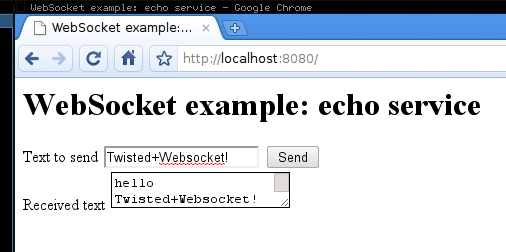
  • Visit http://localhost:8080/ in your WebSocket-enabled browser (e.g. Google Chrome)
  • Here's the console output:
    2010-05-25 21:47:46-0700 [-] Log opened.
    2010-05-25 21:47:46-0700 [-] twisted.web.websocket.WebSocketSite starting on 8080
    2010-05-25 21:47:46-0700 [-] Starting factory <twisted.web.websocket.WebSocketSite instance at 0x94243ac>
    2010-05-25 21:47:56-0700 [HTTPChannel,0,127.0.0.1] 127.0.0.1 - - [26/May/2010:04:47:56 +0000] "GET / HTTP/1.1" 304 - "-" "Mozilla/5.0 (X11; U; Linux i686; en-US) AppleWebKit/533.2 (KHTML, like Gecko) Chrome/5.0.342.9 Safari/533.2"
    2010-05-25 21:47:56-0700 [HTTPChannel,1,127.0.0.1] 127.0.0.1 - - [26/May/2010:04:47:56 +0000] "GET /favicon.ico HTTP/1.1" 404 145 "-" "Mozilla/5.0 (X11; U; Linux i686; en-US) AppleWebKit/533.2 (KHTML, like Gecko) Chrome/5.0.342.9 Safari/533.2"
    2010-05-25 21:48:16-0700 [HTTPChannel,2,127.0.0.1] Received frame 'hello'
    2010-05-25 21:48:25-0700 [HTTPChannel,2,127.0.0.1] Received frame 'Twisted+Websocket!'

See also

Using a Python timeout decorator for uploading to S3

At work we are uploading many images to S3 using Python's boto library. However we are experiencing a RequestTimeTooSkewed error once every 100 uploads on average. We googled, but did not find a solution. Our system time was in sync and our file sizes were small (~50KB).

Since we couldn't find the root cause, we added a watchdog timer as a bandaid solution. We already use a retry decorator to retry uploads to S3 when we get a 500 Internal Server Error response. To this we added a timeout decorator which cancels the S3 upload if it takes more than a couple minutes. With this decorator, we don't have to wait the full 15 minutes before S3 returns the 403 Forbidden (RequestTimeTooSkewed error) response.

I found the timeout decorator at Activestate's Python recipes. It makes use of Python's signal library. Below is an example of how it's used.

import signal

class TimeoutError(Exception):
    def __init__(self, value = "Timed Out"):
        self.value = value
    def __str__(self):
        return repr(self.value)

def timeout(seconds_before_timeout):
    def decorate(f):
        def handler(signum, frame):
            raise TimeoutError()
        def new_f(*args, **kwargs):
            old = signal.signal(signal.SIGALRM, handler)
            signal.alarm(seconds_before_timeout)
            try:
                result = f(*args, **kwargs)
            finally:
                # reinstall the old signal handler
                signal.signal(signal.SIGALRM, old)
                # cancel the alarm
                # this line should be inside the "finally" block (per Sam Kortchmar)
                signal.alarm(0)
            return result
        new_f.func_name = f.func_name
        return new_f
    return decorate

Try it out:

import time

@timeout(5)
def mytest():
    print "Start"
    for i in range(1,10):
        time.sleep(1)
        print "%d seconds have passed" % i

if __name__ == '__main__':
    mytest()

Results:

Start
1 seconds have passed
2 seconds have passed
3 seconds have passed
4 seconds have passed
Traceback (most recent call last):
  File "timeout_ex.py", line 47, in <module>
    function_times_out()
  File "timeout_ex.py", line 17, in new_f
    result = f(*args, **kwargs)
  File "timeout_ex.py", line 42, in function_times_out
    time.sleep(1)
  File "timeout_ex.py", line 12, in handler
    raise TimeoutError()
__main__.TimeoutError: 'Timed Out'

Bug found by Sam Kortchmar (added 2018-08-18)

The code on the Activestate recipe has signal.alarm(0) outside of the finally block, but Sam Kortchmar reported to me that it needs to be inside the finally block so that the alarm will be cancelled even if there is an exception in the user's function that is handled by the user. With signal.alarm(0) outside of the finally block, the alarm still fires in that case.

Here is the test case sent by Sam:

import unittest2
import time

class TestTimeout(unittest2.TestCase):
    def test_watchdog_doesnt_kill_interpreter(self):
        """If this test executes at all, it's working!
        otherwise, the whole testing section will be killed
        and print out "Alarm clock"
        """
        @timeout(1)
        def my_func():
            raise Exception

        try:
            my_func()
        except Exception:
            pass
        time.sleep(1.2)
        assert True

The RequestTimeTooSkewed error

S3ResponseError: 403 Forbidden
<?xml version="1.0" encoding="UTF-8"?>
<Error><Code>RequestTimeTooSkewed</Code><Message>The difference between the request time and the current time is too large.</Message><MaxAllowedSkewMilliseconds>900000</MaxAllowedSkewMilliseconds><RequestId>7DDDS67HF8E37</RequestId><HostId>LKE893JFGDLASKJR9BJ-A9NASFPNAOPWEJORG-98DFGJA498JVJ-A04320JF0293JLKE</HostId><RequestTime>Tue, 27 Apr 2010 22:20:58 GMT</RequestTime><ServerTime>2010-04-27T22:55:24Z</ServerTime></Error>

See also

Options for listing the files in a directory with Python

I do a lot of sysadmin-type work with Python so I often need to list the contents of directory on a filesystem. Here are 4 methods I've used so far to do that. Let me know if you have any good alternatives. The examples were run on my Ubuntu Karmic machine.

OPTION 1 - os.listdir()

This is probably the simplest way to list the contents of a directory in Python.

import os
dirlist = os.listdir("/usr")

from pprint import pprint
pprint(dirlist)

Results:

['lib',
 'shareFeisty',
 'src',
 'bin',
 'local',
 'X11R6',
 'lib64',
 'sbin',
 'share',
 'include',
 'lib32',
 'man',
 'games']

OPTION 2 - glob.glob()

This method allows you to use shell-style wildcards.

import glob
dirlist = glob.glob('/usr/*')

from pprint import pprint
pprint(dirlist)

Results:

['/usr/lib',
 '/usr/shareFeisty',
 '/usr/src',
 '/usr/bin',
 '/usr/local',
 '/usr/X11R6',
 '/usr/lib64',
 '/usr/sbin',
 '/usr/share',
 '/usr/include',
 '/usr/lib32',
 '/usr/man',
 '/usr/games']

OPTION 3 - Unix "ls" command using subprocess

This method uses your operating system's "ls" command. It allows you to sort the output based on modification time, file size, etc. by passing these command-line options to the "ls" command. The following example lists the 10 most recently modified files in /var/log:

from subprocess import Popen, PIPE

def listdir_shell(path, *lsargs):
    p = Popen(('ls', path) + lsargs, shell=False, stdout=PIPE, close_fds=True)
    return [path.rstrip('\n') for path in p.stdout.readlines()]

dirlist = listdir_shell('/var/log', '-t')[:10]

from pprint import pprint
pprint(dirlist)

Results:

['auth.log',
 'syslog',
 'dpkg.log',
 'messages',
 'user.log',
 'daemon.log',
 'debug',
 'kern.log',
 'munin',
 'mysql.log']

OPTION 4 - Unix "find" style using os.walk

This method allows you to list directory contents recursively in a manner similar to the Unix "find" command. It uses Python's os.walk.

import os

def unix_find(pathin):
    """Return results similar to the Unix find command run without options
    i.e. traverse a directory tree and return all the file paths
    """
    return [os.path.join(path, file)
            for (path, dirs, files) in os.walk(pathin)
            for file in files]

pathlist = unix_find('/etc')[-10:]

from pprint import pprint
pprint(pathlist)

Results:

['/etc/fonts/conf.avail/20-lohit-gujarati.conf',
 '/etc/fonts/conf.avail/69-language-selector-zh-mo.conf',
 '/etc/fonts/conf.avail/11-lcd-filter-lcddefault.conf',
 '/etc/cron.weekly/0anacron',
 '/etc/cron.weekly/cvs',
 '/etc/cron.weekly/popularity-contest',
 '/etc/cron.weekly/man-db',
 '/etc/cron.weekly/apt-xapian-index',
 '/etc/cron.weekly/sysklogd',
 '/etc/cron.weekly/.placeholder']

Notes on using Gearman with Python

We recently looked at some lightweight message queue options for a S3 uploader tool. One of the options we tried was Gearman. Gearman was originally developed by Brad Fitzpatrick (author of memcached). Gearman seems to be mature and actively developed. The original Perl version has been rewritten in C for improved performance and I found it easy to use. Here are my notes for getting started on Ubuntu Karmic.

See also

Install and run Gearman server (C version)

There are 2 versions of the Gearman server: the new C version and the original Perl version. I chose the C version.

sudo apt-get install gearman-job-server

During the installation process, Ubuntu/Apt starts the Gearman server process. Running ps -ef | grep gearmand shows me:

gearman    497     1  0 15:41 ?        00:00:00 /usr/sbin/gearmand --pid-file=/var/run/gearman gearmand.pid --user=gearman --daemon --log-file=/var/log/gearman-job-server/gearman.log

This shows the log file is at /var/log/gearman-job-server/gearman.log. Also, it listens at address 127.0.0.1 and port 4730 by default. You can change change the address, port, etc. via the command-line options. To see all the options, type gearmand --help.

Install Python Gearman client library

  • Install pip
  • Install gearman library
    sudo pip install gearman

Example

This example is taken from Graham's article.

producer.py:

import time
from gearman import GearmanClient, Task

client = GearmanClient(["127.0.0.1"])

for i in range(5):
    client.dispatch_background_task('speak', i)
    print 'Dispatched %d' % i
    time.sleep(1)

consumer.py:

from gearman import GearmanWorker

def speak(job):
    r = 'Hello %s' % job.arg
    print r
    return r

worker = GearmanWorker(["127.0.0.1"])
worker.register_function('speak', speak, timeout=3)
worker.work()

First running python producer.py gives me the following terminal output:

Dispatched 0
Dispatched 1
Dispatched 2
Dispatched 3
Dispatched 4

Then running python consumer.py gives me the following terminal output:

Hello 0
Hello 1
Hello 2
Hello 3
Hello 4

Monitoring a filesystem with Python and Pyinotify

Pyinotify is a Python library for monitoring filesystem events on Linux through the inotify Linux kernel subsystem. It can monitor when a file is created, accessed, deleted, modified, etc. For a full list of Pyinotify events see the documentation.

Install Pyinotify

  • Install pip
  • Install Pyinotify
    $ sudo pip install pyinotify
    

Example

import pyinotify

class MyEventHandler(pyinotify.ProcessEvent):
    def process_IN_ACCESS(self, event):
        print "ACCESS event:", event.pathname

    def process_IN_ATTRIB(self, event):
        print "ATTRIB event:", event.pathname

    def process_IN_CLOSE_NOWRITE(self, event):
        print "CLOSE_NOWRITE event:", event.pathname

    def process_IN_CLOSE_WRITE(self, event):
        print "CLOSE_WRITE event:", event.pathname

    def process_IN_CREATE(self, event):
        print "CREATE event:", event.pathname

    def process_IN_DELETE(self, event):
        print "DELETE event:", event.pathname

    def process_IN_MODIFY(self, event):
        print "MODIFY event:", event.pathname

    def process_IN_OPEN(self, event):
        print "OPEN event:", event.pathname

def main():
    # watch manager
    wm = pyinotify.WatchManager()
    wm.add_watch('/var/log', pyinotify.ALL_EVENTS, rec=True)

    # event handler
    eh = MyEventHandler()

    # notifier
    notifier = pyinotify.Notifier(wm, eh)
    notifier.loop()

if __name__ == '__main__':
    main()

Results:

MODIFY event: /var/log/auth.log
MODIFY event: /var/log/syslog
MODIFY event: /var/log/auth.log
MODIFY event: /var/log/syslog
MODIFY event: /var/log/auth.log
MODIFY event: /var/log/syslog
MODIFY event: /var/log/auth.log
OPEN event: /var/log/munin/munin-update.log
MODIFY event: /var/log/munin/munin-update.log
MODIFY event: /var/log/munin/munin-node.log
MODIFY event: /var/log/munin/munin-update.log
CLOSE_WRITE event: /var/log/munin/munin-update.log
OPEN event: /var/log/munin/munin-limits.log
MODIFY event: /var/log/munin/munin-limits.log
CLOSE_WRITE event: /var/log/munin/munin-limits.log
OPEN event: /var/log/munin/munin-graph.log
MODIFY event: /var/log/munin/munin-graph.log
CLOSE_WRITE event: /var/log/munin/munin-graph.log
OPEN event: /var/log/munin/munin-html.log
MODIFY event: /var/log/munin/munin-html.log
CLOSE_WRITE event: /var/log/munin/munin-html.log
MODIFY event: /var/log/auth.log
MODIFY event: /var/log/syslog
MODIFY event: /var/log/auth.log
MODIFY event: /var/log/syslog
MODIFY event: /var/log/auth.log
...