Using Python to write to an Excel / OpenOffice Calc spreadsheet on Ubuntu Linux
Via Matt Harrison's blog post, here is how to write Excel or OpenOffice.org Calc spreadsheet files using Python and the xlwt library. Xlwt is a fork of pyExcelerator which handles only writing spreadsheet files. For reading spreadsheets, see xlrd. Note, these libraries don't use COM, so they will work on non-Windows OSes, such as Linux. For more information, see Matt's blog post. He even has a PDF cheat sheet.
- Install pip
- Install xlwt
sudo pip install xlwt
- Create an example script:
import xlwt

DATA = (("The Essential Calvin and Hobbes", 1988,),
        ("The Authoritative Calvin and Hobbes", 1990,),
        ("The Indispensable Calvin and Hobbes", 1992,),
        ("Attack of the Deranged Mutant Killer Monster Snow Goons", 1992,),
        ("The Days Are Just Packed", 1993,),
        ("Homicidal Psycho Jungle Cat", 1994,),
        ("There's Treasure Everywhere", 1996,),
        ("It's a Magical World", 1996,),)

wb = xlwt.Workbook()
ws = wb.add_sheet("My Sheet")
for i, row in enumerate(DATA):
    for j, col in enumerate(row):
        ws.write(i, j, col)
ws.col(0).width = 256 * max([len(row[0]) for row in DATA])
wb.save("myworkbook.xls")
- Results:
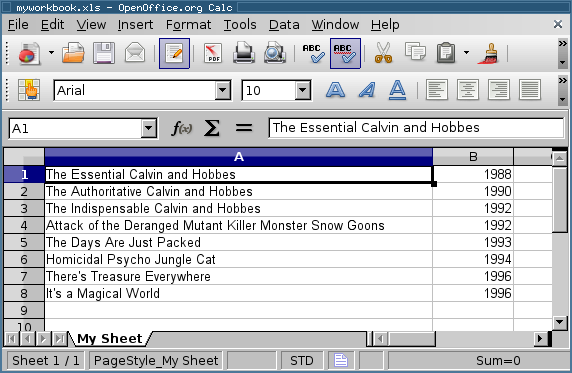
Comments
Just for clarity: I don't think its actually necessary to install pip in order to install xlwt (tho' it may be easier...).
Derek: You're right, it's not necessary-- I'm just evangelizing.
and something I struggled to get right, adding frozen headings with styling to the worksheet:
import xlwt

DATA = (("The Essential Calvin and Hobbes", 1988,),
        ("The Authoritative Calvin and Hobbes", 1990,),
        ("The Indispensable Calvin and Hobbes", 1992,),
        ("Attack of the Deranged Mutant Killer Monster Snow Goons", 1992,),
        ("The Days Are Just Packed", 1993,),
        ("Homicidal Psycho Jungle Cat", 1994,),
        ("There's Treasure Everywhere", 1996,),
        ("It's a Magical World", 1996,),)

wb = xlwt.Workbook()
ws = wb.add_sheet("My Sheet")

# Add headings with styling and froszen first row
heading_xf = xlwt.easyxf('font: bold on; align: wrap on, vert centre, horiz center')
headings = ['Bill Watterson Books', 'Year Published']
rowx = 0
ws.set_panes_frozen(True) # frozen headings instead of split panes
ws.set_horz_split_pos(rowx+1) # in general, freeze after last heading row
ws.set_remove_splits(True) # if user does unfreeze, don't leave a split there
for colx, value in enumerate(headings):
    ws.write(rowx, colx, value, heading_xf)

for i, row in enumerate(DATA):
    for j, col in enumerate(row):
        ws.write(i, j, col)
ws.col(0).width = 256 * max([len(row[0]) for row in DATA])
wb.save("myworkbook.xls")
Darryl: Thank you for adding your notes!
In comment #3 where is: ws.write(i, j, col)
Should be: ws.write(i+1, j, col)
Otherwise it will rise: Exception: Attempt to overwrite cell
Thank's Eliot for the post it helped me a lot and thank you Darryl for the cool tip.
Eloi: Thanks for the fix.
AWESOME article. Saved my life, working on a project that I will need to use this on. Thanks Eliot, this blog rules.
Also, maybe edit the tags and add "excel"?
PATX: Thank you, glad it was helpful.
I also recommend the PyWorkbooks project, although it does not yet work with Open Office, it should soon.
PyWorkbooks is a module to treat open Excel or Gnumeric files (and eventually Open Office) as native python objects, and interface with them using standard calls. (i.e. B[[1, :10] will get you the first 10 points of data on row 1, the same as B['A2:J2'], both are valid), and change it using standard calls as well.
check out the source, distutils install file, and documentation here:
Thanks, that saved a lot of time!
I also recommend the PyWorkbooks project, although it does not yet work with Open Office, it should soon.
Just for those who stumble upon this whilst looking for a tool to create spreadsheets standalone, like me:
Note that PyWorkbooks with Excel currently only works on Win (needs COM) and seems to require an active Excel session. I suppose I missed the word "open" in "[...] treat open Excel or Gnumeric files [...]" in comment #9.
Funny how often I find myself referencing this site. Once again thanks for sharing, suppose this should encourage me to post more random things I run into...
Hi Eliot, really need a help from you. I am doing a project where my raspberry pi will capture the image of a QR code and send it to libre calc. I have done the coding till i can capture and send the data to text file. I need to know how to send the data to libre calc. here is some part of the coding..
QRscan=f.read() if not QRscan==' ': print ('QR : '+ time.ctime() + ' ; ' + QRscan) Student=Student+1 gotStudent=1 try: tfile = open('student.txt') text = tfile.read() except: tfile = open('student.txt' , 'w') tfile.close() tfile = open('student.txt') text=tfile.read()
Great Post It Really Help me a Lot
disqus:2296077028
Here is my last few lines of my python code
s.post('url',data=request_body,headers=h,auth=('un','pw'),verify=False)
print (r.status_code)
print (r.content)
#The print (r.content) prints in JSON such {"KEY1":"VALUE1"} for every
request,{"KEY2":"VALUE2"}. I wanted to write this to excel as below
Col 1 Col2
Key1 VALUE1
key2 Value2

#Below code is to write to csv
data= r.content
File = open("output.xls", 'a')
file.write(r.content)
file.close()
but it is writing as {"KEY1":"VALUE1"},{"KEY2":"VALUE2"} in one cell. Please advise how to write the output to excel in the below format
Col 1 Col2
Key1 VALUE1
key2 Value2
Please help me in finish the above code. Thanks
disqus:3184043272
Having trouble with xlwt.Formula.
This works and places the proper formula in the specified cell and it de- references properly when viewing the spreadsheet
ws = wb.add_sheet('A Test Sheet')
ws.write(3,3,xlwt.Formula("A3+B3")
However this will return "AttributeError: 'CommonToken' object has no attribute 'txt'" when running the python script.
value = "A3+B3"
ws.write(3,3,xlwt.Formula(value))
disqus:3423652969


