How to make urxvt look like gnome-terminal
My terminal of choice is rxvt-unicode (urxvt) because it is fast and lightweight. However, I recently opened up gnome-terminal and it was so much prettier than my urxvt. Here's how I made my urxvt look like gnome-terminal. The last step involves compiling urxvt from source because the latest source includes a patch to configure horizontal spacing of letters.
Set up colors
Add the following to your ~/.Xdefaults file:
! to match gnome-terminal "Linux console" scheme
! foreground/background
URxvt*background: #000000
URxvt*foreground: #ffffff
! black
URxvt.color0  : #000000
URxvt.color8  : #555555
! red
URxvt.color1  : #AA0000
URxvt.color9  : #FF5555
! green
URxvt.color2  : #00AA00
URxvt.color10 : #55FF55
! yellow
URxvt.color3  : #AA5500
URxvt.color11 : #FFFF55
! blue
URxvt.color4  : #0000AA
URxvt.color12 : #5555FF
! magenta
URxvt.color5  : #AA00AA
URxvt.color13 : #FF55FF
! cyan
URxvt.color6  : #00AAAA
URxvt.color14 : #55FFFF
! white
URxvt.color7  : #AAAAAA
URxvt.color15 : #FFFFFF
Select font
Also add the following to your ~/.Xdefaults file:
URxvt*font: xft:Monospace:pixelsize=11
Don't use a bold font
Also add the following to your ~/.Xdefaults file:
URxvt*boldFont: xft:Monospace:pixelsize=11
Fix urxvt font width
This is the most difficult thing to fix. It requires installing urxvt from CVS source.
- Install prerequisites:
apt-get build-dep rxvt-unicode
- Get CVS source code:
cvs -z3 -d :pserver:[email protected]/schmorpforge co rxvt-unicode
- Configure:
cd rxvt-unicode
./configure --prefix=/home/saltycrane/lib/rxvt-unicode-20091102
- Make & make install:
make
make install
- Link urxvt executable to your
~/bindirectory:cd ~/bin ln -s ../lib/rxvt-unicode-20091102/bin/urxvt .
- Edit
~/.Xdefaultsonce again:URxvt*letterSpace: -1
Also cool: Open links in Firefox
Here is another trick (thanks to Zachary Tatlock) to make clicking on URLs open in your Firefox browser. Add the following to your ~/.Xdefaults (yes there's Perl in your urxvt!):
URxvt.perl-ext-common : default,matcher
URxvt.urlLauncher     : firefox
URxvt.matcher.button  : 1
See also
Screenshots
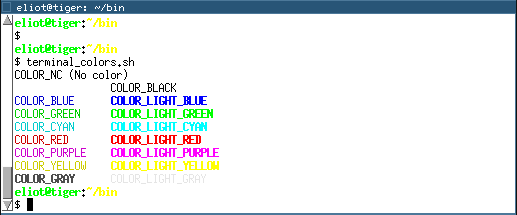
Urxvt (default):
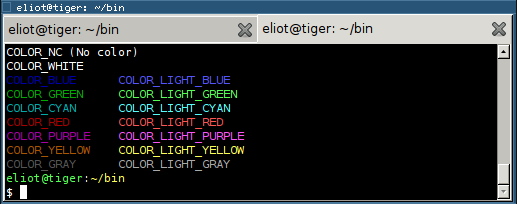
Gnome-terminal:
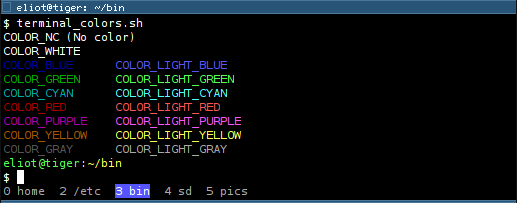
Urxvt (modified):
If you're interested, here is how I printed the terminal colors:
#!/bin/bash
echo -e "\\e[0mCOLOR_NC (No color)"
echo -e "\\e[1;37mCOLOR_WHITE\\t\\e[0;30mCOLOR_BLACK"
echo -e "\\e[0;34mCOLOR_BLUE\\t\\e[1;34mCOLOR_LIGHT_BLUE"
echo -e "\\e[0;32mCOLOR_GREEN\\t\\e[1;32mCOLOR_LIGHT_GREEN"
echo -e "\\e[0;36mCOLOR_CYAN\\t\\e[1;36mCOLOR_LIGHT_CYAN"
echo -e "\\e[0;31mCOLOR_RED\\t\\e[1;31mCOLOR_LIGHT_RED"
echo -e "\\e[0;35mCOLOR_PURPLE\\t\\e[1;35mCOLOR_LIGHT_PURPLE"
echo -e "\\e[0;33mCOLOR_YELLOW\\t\\e[1;33mCOLOR_LIGHT_YELLOW"
echo -e "\\e[1;30mCOLOR_GRAY\\t\\e[0;37mCOLOR_LIGHT_GRAY"
Comments
Please post a screenshot.
gentoo, screenshots added!
Looks great. Thank you!
Thanks! Now urxvt looks more usable to me :)
This is killer. Thanks!
... and add
URxvt.perl-ext-common: default,tabbed
for tabs
source: http://linux.die.net/man/7/urxvt
Just for what it's worth, if anyone else is reading this in the hope that they can get it to work with the font "Akkurat Mono"; don't bother. It doesn't. Thanks to the author for trying, though!
The problem is that the letter spacing is still too wide, even with -1 or some form of -n.


