How to sort a Python dict (dictionary) by keys or values
Updated to work with both Python 2 and 3
How to sort a dict by key
mydict = {
    "carl": 40,
    "alan": 2,
    "bob": 1,
    "danny": 3,
}

for key in sorted(mydict.keys()):
    print("%s: %s" % (key, mydict[key]))
Results:
alan: 2
bob: 1
carl: 40
danny: 3
To sort the keys in reverse, add reverse=True as a keyword argument to the sorted function.
How to sort a dict by value
for key, value in sorted(mydict.items(), key=lambda item: item[1]):
    print("%s: %s" % (key, value))
Results:
bob: 1
alan: 2
danny: 3
carl: 40
Originally taken from Nick Galbreath's Digital Sanitation Engineering blog article
See also
Related posts
- An example using Python's groupby and defaultdict to do the same task — posted 2014-10-09
- python enum types — posted 2012-10-10
- Python data object motivated by a desire for a mutable namedtuple with default values — posted 2012-08-03
- How to sort a list of dicts in Python — posted 2010-04-02
- Python setdefault example — posted 2010-02-09
- How to conditionally replace items in a list — posted 2008-08-22
Comments
Thank you.
Thanks a lot. Exactly what I was looking for.
Thanks, "How to sort a dict by value" was helpful. :)
Thanks for the link to my article. If you need faster dictionary sorting than the ones you describe, it has some tips, as Nick's updated blog also shows.
Gregg, Good work-- your article shows that you have obviously explored this topic much more thoroughly than I have. I will definitely try your method the next chance I get.
tnx
are you sure this works? please see my result (I did in python shell):
>>> d={80: '0101', 75: '1011', 85: '0001', 70: '1111'}
>>> d
{80: '0101', 75: '1011', 85: '0001', 70: '1111'}
>>> kl=list(d.keys())
>>> kl
[80, 75, 85, 70]
>>> new_kl = kl + []
>>> new_kl
[80, 75, 85, 70]
>>> new_kl.sort()
>>> new_kl
[70, 75, 80, 85]
>>> new_d = {}
>>> for k in new_kl:
    new_d[k] = d[k]
    print(new_d)


{70: '1111'}
{75: '1011', 70: '1111'}
{80: '0101', 75: '1011', 70: '1111'}
{80: '0101', 75: '1011', 85: '0001', 70: '1111'}
>>> new_d
{80: '0101', 75: '1011', 85: '0001', 70: '1111'}
>>>
gcd0318:
The items in a dict are stored in an undefined order. Printing the dict only confirms this fact.
If you need to operate on items in a dict in a sorted order, you can operate on each item within the for loop.
Or you can use a data structure that preserves order such as a list or the new OrderedDict data structure in the collections module added in Python 2.7. See http://docs.python.org/library/collections.html#collections.OrderedDict
Can someone explain the following behavior:
DICT = {'C':'C','G':'G','S':'S','E':'E','GE':'GE','fRrc':'GE','fAct':'FO'}
print DICT {'C': 'C', 'E': 'E', 'G': 'G', 'S': 'S', 'fRrc': 'GE', 'GE': 'GE', 'fAct': 'FO'}
Why is the order of the elements in the dictionary changed?
In fact, from what I've understood, there is no defined order about how the elements are stored.
So, the question is ... there is such a structure in python? (I don't want the dictionary to be sorted, I just want to preserve the order how they were initially added).
Thanks
Sweet, thanks for the simple solution!
Thank you. Perfect. Just what I was looking for!
Thanks for that! I was going wild on python.org trying to figure out how to do this.
thanks..:)
mydict = {'carl':40, 'alan':2, 'bob':1, 'danny':3}

print ('Sort by keys:')
for key in sorted(mydict.keys()):
    print ("%s: %s" % (key, mydict[key]))

print ('Sort by items:')
for key, value in sorted(mydict.items(), key=lambda item: (item[1], item[0])):
    print ("%s: %s" % (key, value))
my code works in Python 3.3
It works perfect on 2.7. Thanks!
this works
Thanks
it work well, thx a lot
Its worth noting that Python has a number of dictionary implementations that maintain the order based on the key. Consider the sortedcontainers module which is pure-Python and fast-as-C implementations. Iteration is really fast and automatically yields the keys/items in sorted order. There's also a performance comparison that benchmarks popular options against one another.
what does the "%s: %s" % mean?
disqus:1980282119
Refer to the docs when you have syntax questions. Does transliteration of symbol for a string in the given order. This is why %s is always same, because the iteration. Also "%s: %s" %" means nothing because it's a half of the function. The key is %, and %s is the ocurrence of a previous rule, in this case, a list and a list["item"], in that order because are positional.
disqus:2230871515
Great stuff!
The sorting dictionary by key snippet does produce an array of tuples, which is interesting. Also, you only need to return the value that you are comparing in the lambda, as opposed to flipping the key and value in a tuple.
`
>>> mydict = {'carl':40, 'alan':2, 'bob':1, 'danny':3}
>>>
>>> sorted(mydict.iteritems(), key=lambda (k,v): (v,k))
[('bob', 1), ('alan', 2), ('danny', 3), ('carl', 40)]
>>>
>>> sorted(mydict.iteritems(), key=lambda (k,v): v)
[('bob', 1), ('alan', 2), ('danny', 3), ('carl', 40)]
>>>
`
disqus:3288786392
Yes you're right. Both good points! In case you hadn't already seen it: https://docs.python.org/2/l...
disqus:3291785971
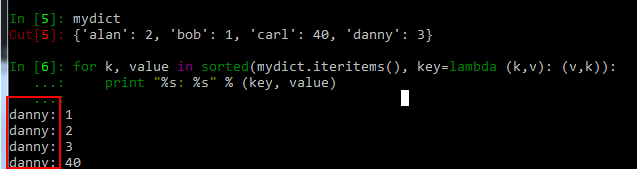
sort dict by value didn't work https://uploads.disquscdn.c...
disqus:3495576529
Thanks
disqus:3533326862
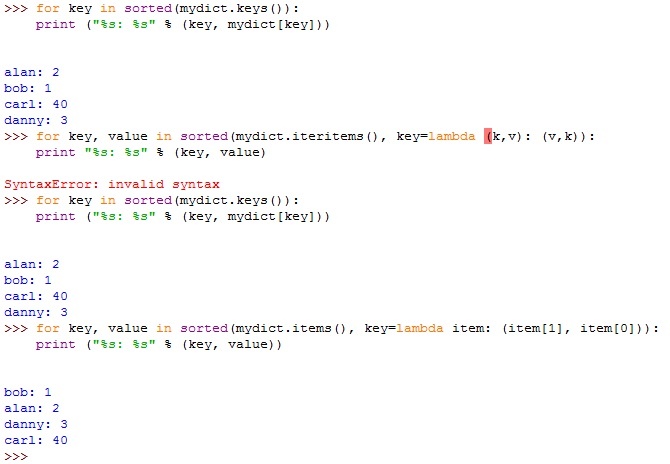
This sorting by values is a little bit ...
kind of not working. Is it because of the version I used? it is Py3.6.
https://uploads.disquscdn.c...
disqus:3585861364
You are printing "key" instead of "k" within the for loop. It should throw an error, you must have defined "key" somewhere above.
it should be print "%s: %s" % (k, value)
disqus:3668854780